


AI Music Video Generator - 1MS
4.0258.00 Reviews
App Specs
- Version
- 1.8.2
- Updated On
- License
- Free
- Downloads
- 100,000+
- Developer
- KRNL SRL
- Categories
- Entertainment
- Platform
- Android
Screenshots
 Analysis by AppCompare
When I want a quick music video, I’m usually starting with a song and a rough idea, not a storyboard or a free afternoon to learn editing software. That’s the situation AI Music Video Generator - 1MS is aimed at: turning a music choice into a visual piece without asking me to build every cut by hand. I see it as an entertainment app for people who want to make something shareable, try out a visual mood, or give a track a more vivid presentation.
Starting with a song and a clear mood
The most useful way to approach a music-video generator is to decide what the finished clip should feel like before opening the editor. A playful track, a quiet acoustic recording, and a high-energy beat call for different visual choices. I’d pick one simple direction—dreamy, bold, nostalgic, or clean—rather than trying to combine every style at once. That gives the visual treatment a job to do instead of turning the project into a collection of unrelated effects.
That starting point matters because the appeal here is speed. KRNL SRL’s app is free to install, and its entertainment focus makes sense for casual creation as much as for musicians testing a visual idea. It has an average rating of 4.0 from around 2,400 ratings, with over 100,000 installs. Those figures suggest a real audience, but I’d still judge the result by whether it fits my own track and intended use, not by popularity alone.
Getting Started with AI Music Video Generator - 1MS
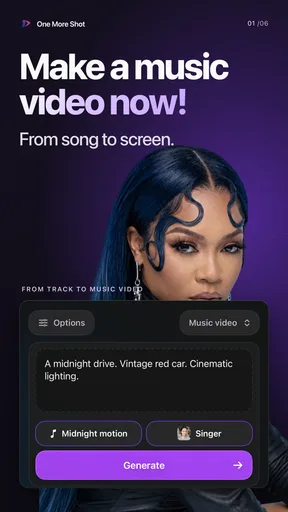
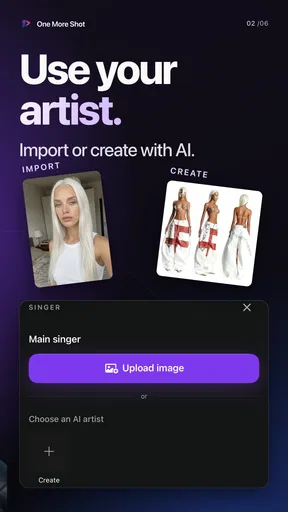
The first thing you'll notice when you open AI Music Video Generator - 1MS is its sleek and user-friendly interface. It’s designed to be intuitive, so even if you’re new to video editing, you won’t feel overwhelmed. The app walks you through the process, starting with selecting a song from either your library or a vast selection of licensed tracks available within the app. It’s as simple as choosing your vibe and hitting next.
Features That Make It Shine
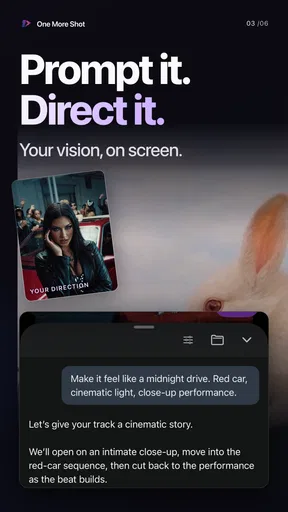
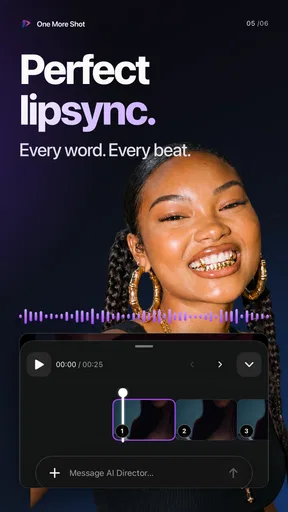
Once you’ve picked your music, the app offers a variety of themes and filters to match your artistic vision. Whether you’re into vintage aesthetics or futuristic vibes, there’s something for everyone. The app uses AI to analyze the music's rhythm and beats, automatically syncing your chosen visuals for a seamless experience. It's like having a virtual director in your pocket!
Customization is a key highlight here. You can tweak everything from the color palette to the transition effects, giving you control over every detail. And if you love adding text overlays or captions, 1MS has a bunch of stylish fonts and animations to make your lyrics pop.
Making a short clip feel intentional
After choosing a theme, I’d treat the first generated pass as a draft rather than a finished music video. Beat-matched cuts can provide momentum, but they don’t automatically create a story or make every image meaningful. A practical workflow is to decide what the viewer should notice first, then use text sparingly and keep the visual style consistent. If the clip is meant to introduce a song, a short title or artist name may be more useful than filling the screen with lyrics.
Worth Reading Before You Choose

EA SPORTS FC Mobile 26 Is a Bigger Football Game, but It Takes Time

Flipboard Shows What News Apps Must Do Beyond the Feed

Switching to Android Auto Means Rethinking Your Driving Routine

Google Calendar Makes a Crowded Week Easier to Manage

Ludo King Makes the Most of the Minutes Between Plans

Baby Panda World Brings Quick Play to Modern Phones, but Its Game Library Feels Busy
There is also a trade-off between letting automation lead and adjusting the details yourself. Automatic timing is handy when I want a fast result, while manual choices are more worthwhile when a particular lyric, musical pause, or change in energy needs emphasis. I would avoid polishing every transition before checking the overall sequence: a coherent mood usually matters more than a string of individually flashy effects.
The Magic of AI in Video Creation
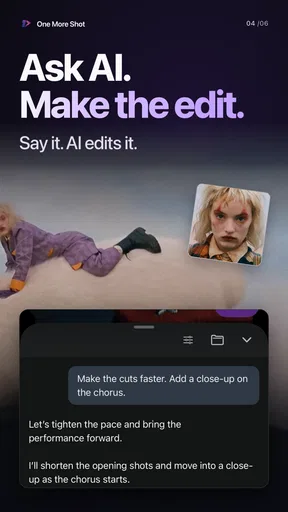
The best part? You don’t need any prior editing knowledge. The app’s AI engine does the heavy lifting, ensuring that each cut and transition matches the tempo of your chosen track perfectly. It’s almost magical how quickly it all comes together, making the entire process incredibly satisfying.
For those who love to experiment, the app also offers an advanced mode. This feature lets you dive deeper into the editing process, giving you the freedom to manipulate layers and effects as you see fit. It’s perfect for those moments when you want to unleash your inner Spielberg.
A useful everyday test: making a post after practice
Imagine finishing a rehearsal with a rough recording you want to share with friends. I’d choose the section that best represents the song, set a visual direction that matches its energy, and make one pass before deciding whether the imagery supports the music. Then I’d check the clip with the sound on and read any text at normal phone size. That last check is easy to skip, but small captions can become hard to follow when the screen is busy or the video is viewed quickly.
This kind of workflow suits a teaser, a personal music experiment, or a social post where the goal is to communicate a mood rather than document a live performance precisely. If the clip is for a release announcement, I’d also make sure the chosen imagery and wording are accurate and that I’m comfortable sharing the material. A fast creative tool can help with presentation, but it cannot decide whether a particular recording or message is ready to go public.
Who benefits from this approach
I can see the app working well for independent musicians who want to explore visual directions before commissioning a more formal video, and for casual creators who would rather assemble a music-led clip than learn a full editing suite. It may also suit someone making a personal montage around a song, provided the aim is expressive rather than documentary. In those cases, an automated starting point can remove enough setup work to make experimentation feel approachable.
It is less compelling if precise shot-by-shot storytelling is the whole point. A conventional editor gives me a more deliberate timeline for matching a specific image to a lyric, controlling the exact duration of a shot, or building a carefully paced narrative. Likewise, if I already have finished footage that must remain the focus, a general video editor may be the better first choice. The distinction is not that one approach is universally better; it is whether I want music-led visual generation or detailed control over existing material.
Handing the result off to other people
When a draft is ready, I’d review it as a viewer rather than as its maker: does the opening make sense immediately, does the visual energy stay in tune with the track, and can the text be read without pausing? If I’m sharing it with a collaborator, I’d agree on the purpose of the clip before asking for feedback. “Does this feel like the song?” is more useful at that stage than collecting vague requests for more effects.
The article’s original workflow describes saving a finished video or sharing it through supported social platforms, and it also describes inviting friends to contribute to a project. Those handoffs can make the app more useful for a group idea, but I’d still keep a personal copy of the version I intend to use. That gives me a clear final file to review and makes it easier to separate a working draft from the version I actually want to post.
Where the flow can break
Automation can make a first cut feel complete before it has earned that feeling. Beat alignment is not the same as musical understanding: a cut can land on time and still clash with a lyric or emotional shift. I’d pay special attention to quieter passages, where rapid visual changes may feel unnecessary, and to moments where the song changes direction. If the generated rhythm is too busy, simplifying the look is a better fix than adding more decoration.
There is also a practical cost to exploring an app that offers in-app purchases. The download is free, but some items are sold within the app, with listed purchase prices ranging from $4.99 to $749.99 per item. I’d look carefully at what an optional purchase provides before committing, especially if I only need one short clip. The wide range makes it sensible to treat paid extras as a deliberate choice rather than assuming that every creative option is included at no cost.
For a first attempt, I’d keep the project small and make a simple test before investing much time or money. That helps answer the questions that matter in practice: whether the available visual direction suits my music, whether I’m comfortable with the editing flow, and whether the finished clip works on the platform where I plan to share it. The app is marked for Everyone, and its current version is 1.8.2; it requires Android 7.0 or later. Those basics make it approachable for many Android users, while the real decision is still whether its music-first workflow matches the job.
Sharing Your Masterpiece
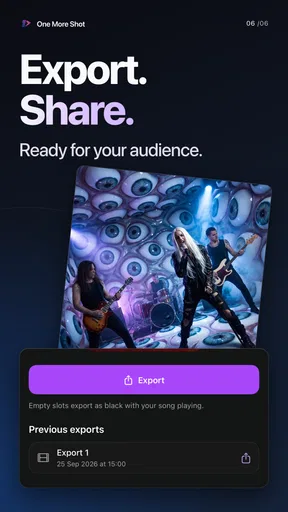
Once your video is ready, sharing it with the world is a breeze. The app supports direct uploads to all major social media platforms, or you can save it to your device to share later. The output quality is impressive, ensuring that your video looks sharp and professional, whether it's on Instagram, TikTok, or YouTube.
Moreover, there’s an option to collaborate with friends. You can invite others to contribute to your video project, making it a fun, social experience. It’s a great way to create something special together, even if you’re miles apart.
Choosing the right tool for the job
Compared with a standard video editor, this app’s strongest appeal is the promise of getting from a chosen track to a visually coordinated draft with less manual arranging. That can be a good exchange when speed and experimentation matter more than exact control. A regular editor is usually the safer choice for a precise music video built around footage you have already filmed, while a design app may be more suitable for a static cover or promotional graphic. I’d choose based on the deliverable, not on which tool sounds more advanced.
There are a few useful questions to settle before starting. If I want a social clip, I’d check that the finished framing and text remain clear on a phone. If I’m using a song from my own library, I’d choose a section that communicates the idea quickly instead of assuming the whole track needs to be represented. And if the project is collaborative, I’d decide who is making the final creative choices so that shared input does not turn into conflicting edits.
The Final Note
All in all, AI Music Video Generator - 1MS is a fantastic tool for anyone looking to create music videos without the steep learning curve usually associated with video editing. It’s perfect for aspiring musicians, content creators, or anyone who just wants to have a bit of fun. The app’s intelligent design and powerful features make it a standout in its category.
If you're curious or eager to start creating, you can download the app directly from the App Store or Google Play Store. Trust me, once you start using it, you'll find yourself coming back for more. Happy creating!
Pros
- User-friendly interface for easy navigation.
- High-quality video output with vivid effects.
- Wide range of music and style options.
- Quick rendering time saves user effort.
- Regular updates with new features.
Cons
- Limited free version features available.
- Occasional glitches in video rendering.
- Ads can be intrusive during use.
- Requires a stable internet connection.
- Music library could be more diverse.
FAQs for AI Music Video Generator - 1MS
What is AI Music Video Generator - 1MS?
AI Music Video Generator - 1MS is an innovative app that allows users to create music videos using artificial intelligence. By inputting a song, the app generates dynamic visuals that synchronize with the music, offering a unique and creative way to produce engaging content without extensive video editing skills.
How does AI Music Video Generator - 1MS work?
The app leverages AI algorithms to analyze audio input and automatically generate video elements that match the rhythm, mood, and style of the music. Users can select from various templates and customization options to enhance the visual experience. The process is intuitive, making it accessible to beginners and professionals alike.
What are the key features of AI Music Video Generator - 1MS?
Key features include a wide range of customizable templates, real-time preview of video generation, and AI-driven synchronization of visuals with music. The app also offers editing tools to personalize videos further and supports high-definition output for sharing across social media platforms. Regular updates introduce new templates and features.
Is AI Music Video Generator - 1MS free to use?
AI Music Video Generator - 1MS offers a free version with basic features, allowing users to explore its capabilities. For advanced functionalities and additional templates, a premium subscription is available. This tier unlocks full access to all features and offers an ad-free experience, enhancing the video creation process.
What are the system requirements for AI Music Video Generator - 1MS?
The app is compatible with both Android and iOS devices. It requires Android 7.0 or later, and iOS 12.0 or later, ensuring smooth performance on modern smartphones and tablets. Adequate storage space is recommended for video saving and exporting, and internet access is necessary for downloading templates and updates.


